


Intro
SEO analytics platforms have become essential tools for businesses that want to improve organic search visibility, understand website performance and demonstrate the commercial value of search engine optimization. In 2026, the best SEO analytics software does more than track keyword rankings. It brings together organic traffic data, backlink analysis, competitor research, technical SEO insights and conversion metrics in reporting dashboards that help marketers make informed decisions.
Choosing the right platform means comparing more than the number of features or the size of a keyword database. Reporting flexibility, data integrations, automated report delivery, dashboard customization and the ability to turn complex metrics into actionable recommendations all influence how effectively a business can manage its SEO strategy. This comparison examines leading SEO analytics platforms, including Semrush, Ahrefs, SE Ranking, Google Search Console, Google Analytics 4 and Looker Studio, with a particular focus on reporting dashboards and automation features.
Lets Dive In
Why SEO Analytics Platforms Matter in 2026
Search engine optimization has become increasingly data-driven. Marketing teams need to understand how search visibility translates into qualified traffic, engagement, leads and revenue. Ranking improvements remain important, but they are only one part of a broader performance picture.
Modern SEO analytics platforms help businesses identify which pages attract organic visitors, which keywords create opportunities, where competitors are gaining visibility and which technical problems may prevent search engines from accessing important content. When combined with website analytics and conversion tracking, these insights provide a clearer understanding of SEO performance.
The growth of AI-powered search experiences and changing search result layouts also makes measurement more complicated. Traditional keyword rankings may not fully explain changes in website traffic or brand visibility. SEO professionals increasingly need to monitor multiple indicators, compare performance across periods and investigate whether content attracts meaningful business outcomes.
Reporting automation is equally important. Manually exporting spreadsheets, copying charts into presentations and rebuilding monthly reports can consume valuable time. Automated SEO reporting tools reduce repetitive work, improve consistency and allow marketers to spend more time interpreting results and implementing improvements.
What to Compare When Choosing SEO Analytics Software
The most suitable SEO analytics platform depends on business objectives, available resources and reporting requirements. A freelancer managing a handful of websites may prioritize affordability and simple dashboards, while a digital marketing agency may require white-label reports, client-specific views and scheduled delivery. Larger organizations may need APIs, advanced integrations, access controls and customized business intelligence dashboards.
Reporting dashboards should make important metrics easy to interpret. These commonly include organic clicks, impressions, click-through rate, keyword positions, estimated organic traffic, referring domains, technical audit findings and conversions. However, not every platform measures these indicators in the same way. Search Console provides first-party Google Search performance data, whereas third-party SEO tools generally provide estimates or measurements from their own databases.
Automation features deserve equally careful attention. Look for scheduled report delivery, reusable templates, automatic data refreshes, custom alerts, integrations with analytics platforms and the ability to distribute different reports to different stakeholders. API access may be valuable when reporting needs to connect with internal databases or business intelligence tools.
The objective is not to select the platform with the longest feature list. It is to create a dependable reporting workflow that answers important questions quickly and consistently.
Semrush: Comprehensive SEO Reporting and Marketing Dashboards
Semrush is a broad digital marketing platform suited to businesses and agencies that want keyword research, competitor analysis, rank tracking, site auditing and reporting within one ecosystem. Its reporting capabilities allow users to combine SEO metrics with other marketing data, helping teams understand organic search performance in a wider commercial context.
Reporting Dashboard Capabilities
Semrush’s My Reports functionality supports customized reports built from platform data and supported integrations. Users can work from templates or create layouts around specific business objectives, including keyword visibility, backlink development, technical SEO and competitor performance. The platform also supports branded reports and reporting across multiple data sources. Its published reporting features include integrations with more than 20 data sources, although the available sources depend on the chosen configuration.
This flexibility can be useful for agencies that need to explain SEO performance to clients who may not understand technical metrics. A report can combine ranking changes with site health indicators and relevant marketing performance data, providing a more complete narrative than a keyword spreadsheet alone.
Automation Features
Semrush supports scheduled report delivery, allowing users to configure reports for daily, weekly or monthly distribution. Once the report structure and schedule have been established, recurring reporting requires less manual intervention.
The main benefit is consistency. Agencies can standardize reporting across clients while adjusting the metrics and commentary to match each account. Nevertheless, automated delivery should not replace analysis. A report showing a traffic decline needs context, investigation and recommended actions rather than an automatically generated chart alone.
Best Use Case
Semrush is a strong option for marketing teams that need an all-in-one SEO analytics and reporting environment. It is particularly useful when competitor analysis, keyword tracking, technical audits and client-facing reporting must work together.
Ahrefs: SEO Performance, Backlink Intelligence and Reporting
Ahrefs is especially well known for backlink analysis, competitor research, keyword exploration and site-level SEO insights. Its reporting tools help businesses monitor changes in search visibility and communicate the results of ongoing optimization work.
Reporting Dashboard Capabilities
The Ahrefs SEO Dashboard brings key metrics into a centralized view, while portfolios allow users to monitor groups of URLs and compare website performance across projects. The platform’s Report Builder supports custom reports using widgets from tools such as Site Explorer and Rank Tracker. Available metrics can include keyword rankings, backlinks, impressions, clicks and other SEO indicators.
This makes Ahrefs useful for teams that need to examine the relationship between content performance, ranking movements and backlink development. For example, an SEO specialist can review whether a campaign has improved keyword visibility while assessing changes in referring domains and the performance of targeted pages.
The exact metrics available depend on the selected report widgets and connected data sources. Businesses should confirm that their chosen configuration covers the KPIs required for stakeholder reporting.
Automation Features
Ahrefs supports scheduled PDF report delivery, allowing users to configure reports once and distribute them automatically. Its reporting documentation describes flexible scheduling options, including hourly, daily, weekly and quarterly delivery. The platform also offers automated notifications for certain SEO changes and integrations for moving data into other reporting environments.
These features are valuable when teams need recurring updates without manually exporting every chart. Alerts can also help identify important changes between scheduled reporting periods.
Best Use Case
Ahrefs is particularly suitable for SEO professionals focused on backlink growth, competitive intelligence, content performance and keyword tracking. Businesses that rely heavily on link-building campaigns or competitor research may find its analysis especially useful.
SE Ranking: Accessible SEO Reporting for Agencies and Businesses
SE Ranking provides keyword tracking, website auditing, competitor analysis, backlink monitoring and reporting features within an integrated SEO platform. Its reporting capabilities make it relevant to freelancers, small businesses and agencies that want structured performance reporting without building a custom analytics system.
Reporting Dashboard Capabilities
SE Ranking’s Report Builder allows users to create reports around selected SEO metrics and customize their presentation. Agency-oriented features include white-label reporting, branded interfaces and options for presenting SEO data under a company’s own identity. These capabilities can help agencies deliver a consistent experience across client accounts.
A practical reporting dashboard might highlight keyword movement, organic visibility, technical audit findings, backlink trends and priority actions. Presenting these indicators together makes it easier for clients to understand what has changed and which improvements require attention.
SE Ranking also supports integrations with analytics tools such as Google Analytics 4, helping users connect SEO performance with traffic and audience information. Integration availability and configuration should be checked against the current subscription and project requirements.
Automation Features
SE Ranking supports scheduled reporting, with configurable delivery frequency, day, time and time zone. Its documentation describes daily, weekly and monthly scheduling, as well as recipient settings. White-label functionality can also support reports delivered under an agency’s own branding.
For a growing agency, this can reduce the workload associated with monthly client updates. Once report templates and schedules are configured, staff can devote more time to explaining performance changes and planning campaigns.
Best Use Case
SE Ranking is worth considering for small and medium-sized businesses, freelancers and agencies that prioritize practical SEO reporting, keyword monitoring and branded client communication. It can be especially attractive to teams seeking a balance between reporting functionality and operational simplicity.
Google Search Console: Essential First-Party Search Performance Data
Google Search Console is a foundational tool for measuring how a website performs in Google Search. Unlike commercial SEO platforms, it is designed to provide website owners with data about Google’s own search results rather than broad third-party estimates of market-wide search activity.
Reporting Dashboard Capabilities
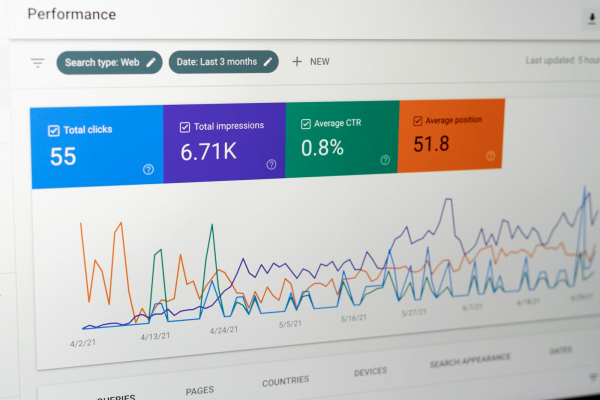
The Performance report provides indicators such as clicks, impressions, click-through rate and average position. Users can examine performance by query, page, country, device and search appearance, subject to available data and report limitations.
These metrics help identify pages that receive substantial impressions but relatively few clicks, queries where visibility is increasing, and content that may benefit from improved titles, descriptions or search intent alignment. Search Console is also useful for investigating indexing issues and monitoring aspects of a site’s technical search presence.
Its primary limitation is scope. Search Console does not replace a full competitor research platform, backlink analysis suite or website conversion analytics system. It should instead serve as a core source of Google Search performance data within a wider reporting workflow.
Automation Features
Search Console can be integrated with reporting and analytics platforms, allowing its search performance data to appear alongside other website metrics. When connected to Looker Studio, for example, teams can build custom dashboards that combine search clicks and impressions with additional reporting sources, depending on the connectors and setup used.
This approach makes it easier to create recurring reports around the metrics that matter to a particular organization. However, automated dashboards still require sensible data definitions and periodic checks to ensure the underlying sources remain connected and accurate.
Best Use Case
Google Search Console is essential for businesses that want direct insight into Google’s search performance data. It is an excellent starting point for SEO reporting, particularly when paired with Google Analytics 4 and a dashboarding tool.
Google Analytics 4: Connecting Organic Traffic with Business Outcomes
Google Analytics 4 (GA4) complements Search Console by measuring activity on a website or app. While Search Console explains how people encounter a site through Google Search, GA4 helps businesses understand what visitors do after arriving.
Reporting Dashboard Capabilities
GA4 provides acquisition, engagement and conversion reporting, with additional exploration tools for customized analysis. SEO professionals can use it to examine organic search sessions, landing-page performance, engaged sessions, key events and conversions.
This distinction is important because increased organic traffic does not automatically mean improved business performance. A landing page may attract more visitors but generate few enquiries or sales. Combining search visibility data with GA4 conversion metrics helps marketers identify which pages attract commercially valuable audiences.
GA4 also supports custom reporting and exploration, allowing analysts to investigate traffic patterns by landing page, channel, device and other dimensions. The usefulness of these reports depends on correct tracking configuration, event definitions and consent-aware data collection.
Automation Features
GA4 supports report sharing and scheduled email delivery for eligible reports. Depending on the report and account configuration, recipients can receive reports in formats such as PDF or CSV.
For SEO teams, scheduled reporting can keep stakeholders informed about organic traffic, engagement and conversions without requiring every recipient to log in and recreate the same report. For more advanced dashboards, GA4 data can also be combined with Search Console and other sources through supported integrations.
Best Use Case
GA4 is most useful for organizations that need to connect SEO performance with user behavior and business outcomes. It is not a replacement for dedicated keyword and backlink research platforms, but it provides critical context for interpreting whether SEO activity is producing meaningful results.
Looker Studio: Custom SEO Dashboards Across Multiple Data Sources
Looker Studio is a reporting and data visualization platform that helps teams turn data from connected sources into shareable dashboards. Rather than replacing SEO research tools, it serves as a presentation and analysis layer that can combine information from multiple platforms.
Reporting Dashboard Capabilities
Looker Studio enables users to design custom dashboards with scorecards, charts, tables, filters and date controls. A well-designed SEO dashboard can bring together Search Console clicks and impressions, GA4 organic traffic and conversions, keyword tracking data from a supported connector, and other business indicators.
This flexibility makes it possible to create dashboards for different audiences. An executive view might emphasize organic leads, revenue and overall visibility, while a technical SEO dashboard could focus on landing pages, indexation trends and site performance indicators.
The main advantage is customization. Teams can shape reports around their own KPIs rather than relying exclusively on the default dashboards of individual SEO platforms. However, the quality of the final dashboard depends on the reliability of the connected data sources, connector availability and how well the data is modeled.
Automation Features
Looker Studio supports scheduled report delivery. Users can distribute reports automatically and configure schedules with relevant filters, helping recipients receive views tailored to their needs. Looker Studio Pro offers additional team-management and delivery capabilities, including expanded scheduling options and alerts for specified chart conditions.
Automation does not eliminate the need to maintain data connections or check for errors. Complex reports may require optimization to ensure scheduled exports render reliably, and access permissions must be configured correctly when sharing sensitive business data.
Best Use Case
Looker Studio is ideal for marketers and analysts who need custom SEO reporting dashboards that consolidate data from multiple platforms. It is particularly useful when management wants one clear view of search visibility, organic traffic, conversions and campaign outcomes.
SEO Analytics Platforms Compared: Reporting and Automation
The most important differences between these tools lie in their primary purpose and the flexibility of their reporting workflows.
Semrush is suited to broad digital marketing reporting, with customizable reports and scheduled delivery. Ahrefs is particularly strong for backlink intelligence, competitor analysis and SEO-focused reporting. SE Ranking offers practical reporting and agency-oriented white-label features. Google Search Console supplies first-party Google Search performance data, while GA4 connects organic visits to on-site behavior and conversions. Looker Studio brings data together into dashboards tailored to the needs of a particular business.
These platforms are not necessarily direct substitutes. In many cases, the best reporting system uses several of them together. Search Console and GA4 provide complementary first-party data, while a dedicated SEO platform supplies additional keyword, backlink, audit and competitor insights. Looker Studio can then consolidate supported sources into a shared dashboard.
Businesses should also evaluate reporting limits, integration costs, available API access, user permissions and the features included in each subscription. Some advanced reporting or white-label capabilities may require particular plans or add-ons. Current plan details should be checked before making a purchasing decision.
How to Build an Effective SEO Reporting Dashboard
A useful SEO dashboard begins with a clear business question. Rather than displaying every metric available, choose indicators that explain whether the SEO strategy is working and what needs attention.
For an ecommerce website, a dashboard might track organic landing-page sessions, product-page visibility, non-branded keyword clicks, organic conversions and revenue attributed to organic search. For a service business, qualified leads, enquiry form completions, local visibility and performance of service pages may be more relevant.
Consistent reporting periods are essential. Month-on-month comparisons can highlight recent movement, while year-on-year comparisons help account for seasonality. Annotating significant events—such as site migrations, major content updates, tracking changes or seasonal campaigns—helps prevent misleading conclusions.
A dashboard should also separate leading indicators from business outcomes. Impressions, ranking movements and indexation trends can indicate emerging opportunities or problems. Leads, sales and revenue help establish whether those changes matter commercially. Neither category tells the full story in isolation.
Finally, reports should include interpretation and next steps. A chart showing a fall in organic clicks is not a complete insight. A useful report investigates whether the change resulted from lower impressions, a weaker click-through rate, altered search demand, ranking losses or a tracking issue, then identifies the appropriate response.
SEO Reporting Automation: Benefits and Limitations
Automating SEO reports reduces repetitive administrative work and improves consistency. Once a reporting template is configured, teams can distribute recurring updates without manually collecting and formatting the same metrics every month. Automated alerts can also help surface unexpected changes between reporting periods.
Consider an agency managing 20 client websites. If manual reporting takes two hours per client each month, that amounts to 40 hours of reporting work. If reusable templates and automated delivery reduce the process to 45 minutes of review and interpretation per client, the workload becomes 15 hours. The potential saving is 25 hours per month. This is an illustrative calculation, not a guaranteed outcome; the actual result depends on the complexity of each account and the reliability of the reporting setup.
There are limitations. Automated reports can distribute incorrect data if tracking breaks, connectors fail or metric definitions change. A ranking movement may reflect location, device, search intent or normal search-result volatility rather than a meaningful change in business performance. Automated commentary can also oversimplify complex developments if it is not reviewed by a knowledgeable analyst.
The most effective approach combines automation with human oversight. Automate data collection, repetitive calculations, scheduled delivery and selected alerts, while retaining human responsibility for interpreting results, prioritizing actions and communicating uncertainty.
Choosing the Right SEO Analytics Platform for Your Business
Freelancers and small businesses should begin with essential first-party data from Search Console and GA4, then decide whether paid keyword research, backlink analysis and automated reporting features would materially improve their workflow. Looker Studio may provide a cost-effective way to combine supported data sources into a custom dashboard, although connectors and setup requirements should be considered.
Growing marketing teams may benefit from Semrush or Ahrefs when competitor research, keyword monitoring, backlink analysis and recurring reporting are central to their work. Agencies that prioritize branded reports and client communication should assess SE Ranking alongside the reporting features available from larger all-in-one platforms.
Larger organizations should evaluate integration depth, API access, data governance, permissions, report scalability and compatibility with their existing analytics infrastructure. A platform that performs well for one SEO specialist may not be the right choice for a team managing multiple regions, brands and stakeholders.
Before committing to a subscription, define the KPIs that must appear in reports, identify the sources of truth for each metric and test a representative reporting workflow. A short practical trial can reveal whether the dashboard is understandable, the data can be trusted and automation genuinely saves time.
Developing SEO Analytics and Reporting Skills
Knowing how to operate an SEO analytics platform is only one part of effective search marketing. Professionals also need to interpret data, understand measurement limitations, identify search intent, evaluate technical issues and communicate recommendations clearly.
Online learning provides a practical way to develop these skills without committing to a lengthy traditional education pathway. Courses covering SEO fundamentals, Google Analytics 4, search performance analysis and dashboard design can help learners build a stronger foundation in data-driven marketing.
The most valuable learning combines structured instruction with practical projects. Build a dashboard for a real or sample website, compare search performance across reporting periods, identify a landing page with improvement potential and explain how you would measure the impact of a change. These projects can demonstrate practical competence to employers, clients and freelance customers.
SEO analytics also rewards continuous learning. Platforms evolve, search results change and new reporting features become available. Professionals who regularly review their workflows and develop their analytical skills are better equipped to turn increasingly complex data into clear business decisions.
Recommended Online Courses to Build SEO Analytics Skills in 2026
Introduction to Google SEO — Coursera
Platform: Coursera
Level: Beginner
Focus: SEO fundamentals, search visibility, content optimization, search algorithms and data-informed SEO strategy.
Offered by the University of California, Davis, this course provides a foundation for understanding how search engines work and how SEO performance can be improved. The published course listing reports a 4.6/5 rating and more than 351,000 enrolments. It is a useful starting point for learners who want to understand the SEO concepts behind the metrics they will later analyze.
Master Google Analytics 4 Reports and GTM Basics — Udemy
Platform: Udemy
Level: Beginner to Intermediate
Focus: GA4 reporting, custom reports, data analysis, Google Tag Manager fundamentals and dashboard reporting.
This practical course focuses on interpreting Google Analytics 4 reports and configuring analytics to answer business questions. Its published listing reports a 4.8/5 rating from more than 2,200 ratings and an April 2026 update. It is relevant for SEO professionals who want to connect organic traffic reporting with broader website analytics and conversion measurement.
Mastering SEO: How to Develop a Superior SEO Strategy — LinkedIn Learning
Platform: LinkedIn Learning
Level: Beginner to Intermediate
Focus: SEO strategy, keyword research, audits, performance data and building SEO reports for stakeholders.
This course includes content on SEO reporting and data, including how to structure a report around key performance indicators, changes over time and recommendations. It can help learners develop the communication skills required to turn analytics into a clear narrative for managers or clients. Access is subject to LinkedIn Learning’s current subscription terms.
View Course on Linkedin Learning
Final Thoughts
Choosing the right SEO analytics platform depends on reporting flexibility, automation, data quality and business needs. Semrush and Ahrefs provide comprehensive SEO analysis, while SE Ranking offers agency-focused reporting and white-label options. Google Search Console and Google Analytics 4 deliver complementary performance insights, and Looker Studio combines supported data sources into customized dashboards. Connecting these tools creates a more effective reporting workflow, helping businesses understand search visibility, visitor behaviour, keyword performance and competitor activity in one accessible view.
Automation streamlines SEO reporting by reducing repetitive tasks, standardizing delivery and highlighting performance changes sooner, but accurate tracking and human interpretation remain essential. For digital marketers, freelancers and career changers, developing SEO analytics and reporting skills provides a practical pathway to more data-driven marketing roles. Learning to build dashboards, automate reporting and translate metrics into actionable recommendations enables professionals to improve campaign performance and demonstrate the measurable value of SEO.